You’re shopping for a monitor for your PS5 or Xbox Series X. You’ve narrowed it down to a 27″ screen. And now you’re staring at two options: a sharp 1080p panel at $180, or a 1440p panel at $250. The question every console gamer asks at this point:
Does the resolution difference actually matter on a 27″ screen, or is it marketing fluff?
The honest answer: yes, it matters — but maybe not as much as spec sheets suggest. Let’s break it down properly.
⚠️ Affiliate Disclosure: TechPlayGrid is reader-supported. When you buy through links on our site, we may earn an affiliate commission at no extra cost to you.
🔬 Understanding the Numbers First
Resolution
Pixel Count
Also Known As
1080p
1,920 × 1,080 = ~2.07 million pixels
Full HD / FHD
1440p
2,560 × 1,440 = ~3.69 million pixels
2K / QHD
4K
3,840 × 2,160 = ~8.29 million pixels
UHD
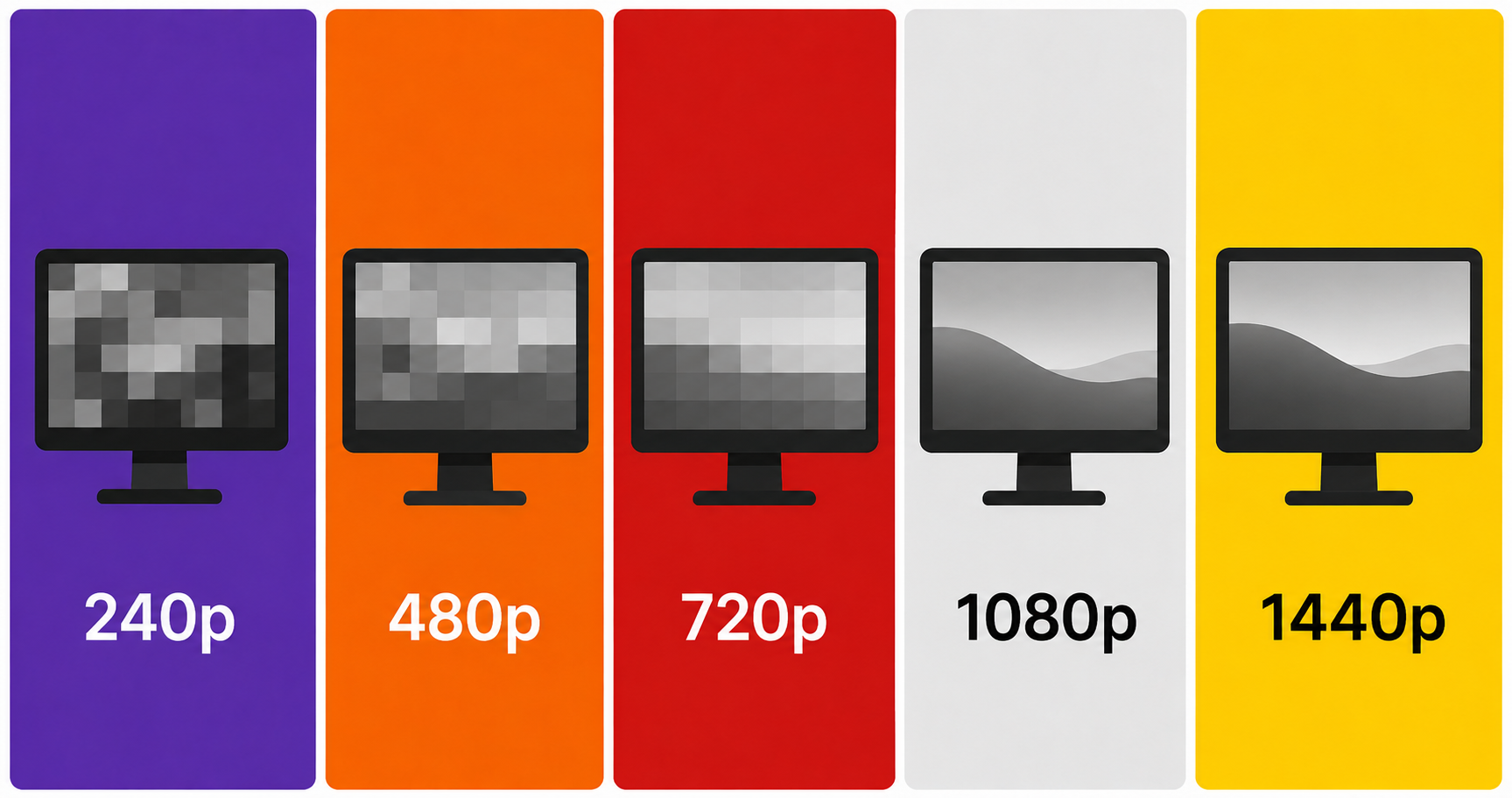
Going from 1080p to 1440p means 78% more pixels on the same screen size. That’s a significant jump — on paper.
📐 Pixel Density: The Real Metric That Matters
Raw resolution means nothing without context. What actually determines visual sharpness is PPI (pixels per inch) — how many pixels are packed into each inch of screen space.
Resolution
Screen Size
PPI
1080p
27″
~82 PPI
1440p
27″
~109 PPI
1080p
24″
~92 PPI
1440p
24″
~122 PPI
Human vision generally stops perceiving individual pixels beyond ~90–100 PPI at a normal viewing distance (60–80cm / 24–32 inches). This means:
1080p on 27″ sits right at the edge of perception. Pixels are visible if you look closely.
1440p on 27″ is noticeably sharper. Text, fine details, and textures look more refined.
💡 Pro Tip: 1080p looks perfectly fine on 24″ screens. The upgrade to 1440p matters most at 27″ and above. If you’re choosing a 27″ panel, 1440p is the sweet spot.
🎮 How PS5 and Xbox Series X Handle 1440p
Here’s where it gets console-specific:
Console
1440p Native Support?
Notes
PS5
✅ Yes (since 2022 update)
Supports 1440p@120Hz via HDMI 2.1
Xbox Series X
✅ Yes (native)
Supports 1440p@120Hz via HDMI 2.1
Xbox Series S
✅ Yes (primary target)
The Series S was designed around 1440p
PS4 / Xbox One
❌ No
Max 1080p on older consoles
Both current-gen consoles now fully support 1440p. If you have a PS5 or Xbox Series X, you won’t be wasting the resolution.
💡 Pro Tip: Some PS5 games render natively at 1440p, while others render at 4K and downsample to 1440p — which actually looks sharper than native 1440p. Either way, you win.
👁️ When You’ll Actually Notice the Difference
The resolution gap between 1080p and 1440p is most visible in these scenarios:
You’ll clearly see the difference in:
Open-world games — distant foliage, building textures, horizon details (Horizon Forbidden West, Elden Ring, Red Dead Redemption 2)
Text and UI elements — inventory screens, subtitles, in-game menus
Best for: Cost-conscious buyers upgrading from 1080p
📊 Final Verdict Comparison Table
1080p 27″
1440p 27″
Sharpness
Acceptable
Noticeably better
Console Support (PS5/XSX)
✅ Full
✅ Full
Best for competitive gaming
✅ Higher Hz options at lower price
✅ Still great
Best for story/cinematic games
⚠️ Adequate
✅ Clearly better
Future-proof
⚠️ Less so
✅ Yes
Price range
$150–$250
$220–$350
🏁 The Bottom Line
On a 27″ screen, 1440p is the better choice for console gaming in 2026 — especially with PS5 and Xbox Series X natively supporting it. The jump in pixel density is visible in real gameplay, and the price gap between good 1080p and good 1440p monitors has narrowed significantly.
That said, if your budget is tight and you play mostly fast-paced competitive games, a high-Hz 1080p monitor like the Samsung Odyssey G4 is not a bad choice at all. Speed beats resolution in CS2 and Valorant.
Our recommendation: If you’re spending over $200 on a 27″ monitor anyway, round up to 1440p. You won’t regret it.
❓ FAQ
Does 1440p reduce FPS on console? Yes, slightly. Higher resolution requires more GPU power. Most PS5/Xbox Series X games are optimized for either 4K or 1440p modes, so you typically choose between resolution and frame rate in the game’s settings.
Is 1440p the same as 2K? Technically, “2K” refers to 2048×1080 (a cinema standard). But in consumer marketing, 1440p is often called 2K. They’re close but not identical.
Can PS5 do 1440p at 120Hz? Yes — since the 2022 firmware update, PS5 natively supports 1440p at up to 120Hz over HDMI 2.1.
Is a 27″ monitor too big for gaming at a desk? At a normal desk distance of 60–80cm, 27″ is the mainstream sweet spot. It fills your field of view without requiring head movement.
Should I get a 32″ monitor at 1440p instead? At 32″, 1440p PPI drops to ~92 — which is the same as 1080p on 24″. If you go 32″, consider 4K to maintain sharpness. For 27″, 1440p is ideal.
Looking for the Best 144Hz Monitor Under $300 for PS5 and Xbox Series X (2026)? We got you covered. Check out our latest post now!
Last updated: June 2026 | Prices may vary by retailer and region.
⚠️ Affiliate Disclosure: TechPlayGrid participates in the Amazon Associates Program and other affiliate programs. We earn a small commission on qualifying purchases at no extra cost to you. Our recommendations are always based on honest research and testing.
You’re mid-match in Valorant, peeking a corner — and suddenly your Discord call cuts out, your frames tank, or your voice starts robot-chopping through the mic. Your teammates can’t hear callouts. You die. You tilt.
Sound familiar?
This is one of the most common complaints from PC gamers, and the good news is: most of the fixes are completely free and take under 10 minutes. We’ll walk you through every solution, from the easiest to the most advanced. Only at the very end will we suggest any hardware upgrades — and only if you truly need them.
⚠️ Affiliate Disclosure: TechPlayGrid is reader-supported. When you buy through links on our site, we may earn an affiliate commission at no extra cost to you.
🔍 Why Does Discord Lag While Playing Valorant?
Before fixing anything, let’s understand why this happens. There are three main culprits:
Cause
What It Does
CPU/RAM bottleneck
Your PC struggles to run both Valorant and Discord simultaneously
Network congestion
Your router can’t prioritize voice traffic over game data
Discord settings
Default settings aren’t optimized for gaming
Valorant is a competitive shooter — it’s demanding on CPU and network. Discord’s voice processing also uses CPU cycles. When they fight for resources, one (or both) suffers.
✅ Step-by-Step Fixes (Free, Software Only)
🛠️ Fix 1 — Lower Discord’s Hardware Acceleration
Time: 1 minute | Difficulty: Easy
Discord uses your GPU to render its interface by default. This sounds helpful, but in practice it competes with Valorant for GPU resources.
Open Discord → Settings (gear icon)
Go to Advanced
Toggle Hardware Acceleration → OFF
Restart Discord
💡 Pro Tip: This single fix resolves the lag for most users. Do this first before anything else.
🛠️ Fix 2 — Change Discord’s Audio Subsystem
Time: 2 minutes | Difficulty: Easy
Discord’s default audio subsystem (“Standard”) can cause conflicts with games. Switching to Legacy often fixes voice cutting out.
Discord → Settings → Voice & Video
Scroll down to Audio Subsystem
Change from Standard to Legacy
Restart Discord
🛠️ Fix 3 — Set Discord and Valorant Process Priorities in Windows
Time: 3 minutes | Difficulty: Medium
Windows doesn’t automatically know which apps matter most. You can manually tell it to prioritize Valorant (game performance) and give Discord just enough CPU to function smoothly.
Launch both Valorant and Discord
Press Ctrl + Shift + Esc to open Task Manager
Go to the Details tab
Right-click VALORANT-Win64-Shipping.exe → Set Priority → High
Right-click Discord.exe → Set Priority → Below Normal
⚠️ Warning: Setting Valorant to “Real Time” priority can cause system instability. “High” is the sweet spot.
🛠️ Fix 4 — Disable Windows Game Mode (Counterintuitive But Effective)
Time: 1 minute | Difficulty: Easy
Windows Game Mode sounds great in theory, but it can actually cause stutters by aggressively reallocating resources mid-game.
Press Windows + I → Gaming → Game Mode
Toggle Game Mode → OFF
Reboot your PC
🛠️ Fix 5 — Flush Your DNS and Renew IP
Time: 2 minutes | Difficulty: Easy
Stale DNS cache can cause both Valorant and Discord to have unstable connections. This clears it out.
Press Windows + R → type cmd → Run as Administrator
🛠️ Fix 6 — Enable Quality of Service (QoS) on Your Router
Time: 5–10 minutes | Difficulty: Medium
QoS tells your router to prioritize certain types of traffic — in this case, your game and voice data — over other household bandwidth hogs (Netflix, cloud backups, etc.).
Open your browser and go to your router’s admin panel (usually 192.168.0.1 or 192.168.1.1)
Log in (check the sticker on your router for default credentials)
Find QoS or Traffic Priority settings
Set Gaming or Voice/VoIP to highest priority
💡 Pro Tip: Not all routers have QoS. If yours doesn’t, it might be time for a router upgrade — more on that below.
Discord’s built-in Krisp noise suppression is AI-powered and surprisingly CPU-hungry. If your PC is older, this alone can cause stutters.
Discord → Settings → Voice & Video
Under Noise Suppression, select None or Krisp (light)
Alternatively, disable Echo Cancellation if not needed
🛠️ Fix 8 — Optimize Valorant’s In-Game Settings for Better CPU Headroom
Time: 5 minutes | Difficulty: Easy
Freeing up CPU cycles inside Valorant gives Discord more room to breathe.
Recommended settings in Valorant:
Setting
Recommended Value
Limit FPS on Battery
On
Limit FPS in Menus
On (set to 60)
Limit FPS in Background
On (set to 30)
Multithreaded Rendering
On
Material Quality
Low
Texture Quality
Low
Detail Quality
Low
UI Quality
Low
Bloom / Distortion
Off
💡 Pro Tip: Valorant pros play on these exact low settings — not because their PCs can’t handle more, but because it maximizes frame rate consistency and reduces input lag.
📊 Fix Priority Cheat Sheet
Fix
Impact
Time
Difficulty
Disable Hardware Acceleration
⭐⭐⭐⭐⭐
1 min
Easy
Change Audio Subsystem to Legacy
⭐⭐⭐⭐
1 min
Easy
Set Process Priority
⭐⭐⭐⭐
3 min
Medium
Disable Game Mode
⭐⭐⭐
1 min
Easy
Flush DNS
⭐⭐⭐
2 min
Easy
Enable Router QoS
⭐⭐⭐⭐⭐
10 min
Medium
Disable Krisp
⭐⭐⭐
1 min
Easy
Optimize Valorant Settings
⭐⭐⭐⭐
5 min
Easy
💻 Still Lagging? Maybe It’s Time for a Hardware Upgrade
If you’ve done everything above and still experience lag, your hardware is likely the bottleneck. Here’s what to look at:
Option A — Upgrade Your Router
If multiple people share your internet and QoS isn’t available on your current router, a Wi-Fi 6 router with proper QoS is a game-changer.
Valorant + Discord + Windows background processes need at least 16GB RAM. If you have 8GB, upgrading is the single most impactful hardware change you can make under $50.
Sometimes Discord voice issues come from a low-quality microphone creating feedback loops. A headset with a cardioid mic and built-in noise cancellation eliminates that entirely.
Why does my Discord cut out only during Valorant matches? Valorant is CPU-intensive during active matches. The spike in CPU usage leaves less headroom for Discord’s voice processing. Fixes 1, 2, and 3 above address this directly.
Is it safe to set Valorant to High priority in Task Manager? Yes, “High” is safe. Avoid “Real Time” — that can destabilize Windows.
Does running Discord as Administrator help? Sometimes. Right-click the Discord shortcut → Run as Administrator and test it.
Will a VPN help with Valorant lag? Generally no — VPNs add a routing hop that increases latency. Only use a gaming VPN if your ISP is specifically throttling gaming traffic.
Can I use Discord on my phone instead to save PC resources? Yes! Joining Discord voice chat on your phone via Wi-Fi is a great workaround while you troubleshoot. It offloads all audio processing from your PC entirely.
Last updated: June 2026
⚠️ Affiliate Disclosure: TechPlayGrid participates in the Amazon Associates Program and other affiliate programs. We earn a small commission on qualifying purchases at no extra cost to you. Our recommendations are always based on honest research and testing.
The internet is full of get-rich-quick promises. However, the reality is very different from that — and honestly, a lot more interesting. Making money online in 2026 is completely achievable, but it requires consistency, choosing the right path, and above all, realistic expectations.
That’s why, in this article, we cut straight to the point. No magic formulas, no “make $5,000 in your first month.” Just the 5 methods that actually work, with estimated timelines, average earnings, and free tools to get you started right now.
1. 📝 Start a Monetized Blog
Starting a blog is, without a doubt, one of the most solid and scalable ways to build passive income online over the long term. The idea is straightforward: you write about a subject you know well or are passionate about, attract visitors through Google, and monetize through ads and affiliate links.
How it works in practice
You pick a niche — gaming, technology, personal finance, cooking, health, travel — and publish articles regularly, optimized to rank on Google (this is called SEO). As your traffic grows, you activate Google AdSense to display ads and insert affiliate links from programs like Amazon Associates to earn commissions on product recommendations.
Free or low-cost tools to get started
Hosting: Hostinger starting at around $3/month — best value for beginners
CMS: WordPress (free, one-click install on Hostinger)
SEO: Ubersuggest (free tier) and Google Search Console (completely free)
Affiliate program: Amazon Associates (free to join)
Images: Unsplash and Canva (both free)
What equipment you’ll need
For writing articles, a basic laptop is all you need to start. However, if you want to scale with video content and richer media, a decent setup makes a big difference:
Medium — requires consistency and basic SEO knowledge
🎯 Practical tip: aim to publish at least 3 articles per week to accelerate growth. The more quality content you have indexed on Google, the more visitors you attract — and the more you earn. That’s exactly the strategy we follow here at TechPlayGrid!
2. 🎥 Faceless YouTube Channel
A faceless YouTube channel — also known as a “dark channel” — is a YouTube channel where you never have to show your face. Instead, videos are built using voiceover narration (your own voice or AI-generated), stock footage, animations, and on-screen text. In 2026, this is one of the most scalable ways to generate passive income, especially with the rapid advancement of AI content tools.
How it works in practice
You choose a niche — trivia, history, personal finance, technology, true crime, motivation — and publish videos consistently. Once you reach 1,000 subscribers and 4,000 watch hours, your channel can apply for the YouTube Partner Program and start earning from ads. YouTube also offers an entry-level tier at just 500 subscribers and 3,000 watch hours that unlocks fan funding features.
In addition to YouTube ad revenue, you can place affiliate links in your video descriptions — a passive income stream that keeps working as long as the video gets views, even months after it was published.
Free or low-cost tools to get started
Scriptwriting: ChatGPT or Claude (free tiers available, paid for more volume)
AI voiceover: ElevenLabs (free plan available) or use your own voice
Video editing: CapCut (free) or DaVinci Resolve (free)
Stock footage and images: Pexels, Pixabay, and Unsplash (all free)
Thumbnails: Canva (free)
What equipment you’ll need
To start with your own voiceover narration, a decent USB microphone is the only essential hardware investment. Furthermore, if you plan to record screen content or gaming footage, a capable PC or laptop helps significantly:
Medium — requires consistency and attention to audience retention metrics
⚠️ Watch out for: reusing copyrighted content, prioritizing quantity over quality, ignoring audience retention data, and quitting too early. The key is to test different formats, watch your analytics closely, and adjust based on what your audience actually watches.
3. 📱 Monetizing Social Media (Instagram, TikTok, and Pinterest)
Social media has long evolved beyond entertainment. In 2026, it’s one of the most accessible entry points for online income — especially when combined with affiliate marketing.
How it works in practice
You build profiles on one or more social media platforms around a specific niche — beauty, fitness, tech, gaming, cooking, personal finance — and post content consistently. As your audience grows, you insert affiliate links in your bio, stories, and post descriptions to earn commissions on purchases. In addition, brands start paying for sponsored posts once your profile reaches meaningful engagement.
Pinterest deserves special attention here. Unlike Instagram and TikTok, where the algorithm quickly buries older posts, Pinterest is a search platform — therefore, a pin you create today can continue generating clicks and sales for years.
Free tools to get started
Post creation: Canva (free)
Scheduling: Meta Business Suite (free for Instagram and Facebook)
Affiliate links: Amazon Associates, ClickBank, ShareASale (all free to join)
Link in bio: Linktree or Beacons (both free)
What equipment you’ll need
For creating high-quality content on Instagram and TikTok, where visual quality directly impacts reach, a decent camera makes a real difference:
Medium/High — the algorithm demands daily consistency and creativity
💡 Tip: don’t try to be everywhere at once. Start with one platform, master its format, and then expand. TikTok offers the fastest organic growth potential in 2026; Pinterest has the best long-term passive income potential.
4. 🔗 Affiliate Marketing (Without a Blog or Channel)
Affiliate marketing doesn’t require a blog or a YouTube channel to work. That’s one of its biggest advantages in 2026: you can share affiliate links in WhatsApp groups, Telegram channels, Reddit communities, niche forums, and even in YouTube video comments — as long as it’s relevant and not spammy.
The Amazon Associates program, for example, is free to join, accepts promotion through social media, and doesn’t require a website. Commissions range from 1% to 10% depending on the product category — and the 24-hour cookie means you earn commission on everything the customer buys during that window, not just the product you recommended.
Affiliate platforms to get started
Amazon Associates — physical products, high conversion rate, commissions of 1%–10%
ClickBank — digital products (courses, e-books), commissions of 20%–75%
ShareASale — wide range of physical and digital products
Impact — brands and SaaS tools, often higher commissions
How to promote without spending money
WhatsApp groups and Telegram channels focused on deals
Relevant comments on YouTube videos in your niche
Instagram bio and stories with a Linktree
Reddit communities and specialized forums
Return timeline
⏱️ Time to first earnings
2 weeks to 2 months
💰 Average monthly (beginner, organic promotion)
$100 to $600
💰 Average monthly (intermediate, multiple channels)
$600 to $3,000
💰 Potential (advanced, at scale)
$5,000+
💸 Minimum starting investment
$0
📈 Difficulty
Low to start — medium to scale consistently
💡 Important: to keep your Amazon Associates account active, you need to make at least 3 sales within your first 180 days. For that reason, start by promoting affordable, popular products to secure those first sales quickly.
5. 🎓 Create and Sell an Online Course
Creating an online course is the option with the highest revenue-per-effort potential — but it’s also the one that demands the most upfront work. The concept is simple: you have knowledge that other people want to learn, you package it into video lessons, and sell it repeatedly on autopilot.
The best part is that, unlike a regular job, your course keeps selling while you sleep. Therefore, it’s one of the purest forms of passive income available today.
What you can teach
Anything you know better than the average person. Practical examples: video editing, English, Excel, cooking, digital illustration, photography, digital marketing, coding, personal finance, crafts. Don’t underestimate what you know — there’s an audience for virtually every niche.
Platforms to host your course
Teachable — free plan available, beginner-friendly
Udemy — free to publish, but the platform takes a percentage
Gumroad — simple setup, low fees, great for solopreneurs
Thinkific — free plan with solid features
What equipment you’ll need
Here, equipment investment matters more than in any other option on this list. A course with good audio and video quality sells significantly better than one that looks and sounds amateur. For that reason, investing in a decent microphone and camera from the start pays for itself quickly:
Right after launch, if you already have an audience
💰 Average monthly (niche course, beginner)
$200 to $1,500
💰 Average monthly (established course with audience)
$2,500 to $10,000+
💸 Minimum starting investment
$0 (using Teachable or Udemy free tiers)
📈 Difficulty
High — requires solid content creation and a sales strategy
💡 Tip: before recording the entire course, validate the idea by selling early access. If people pay before the course exists, you’ve proven there’s a market for it. Only then record everything properly — it saves you weeks of work on content nobody wanted.
🖥️ The Right Equipment Makes a Difference
Regardless of which path you choose, a good setup accelerates your results. Whether you’re writing articles faster, recording better-quality videos, or editing content, the right equipment saves time and improves your output.
💡 Speaking of setup — if you don’t have a capable PC yet, check out our full guide:PC Gaming Setup: Everything You Need to Get Started in 2026 — we break down configurations by budget that work just as well for content creation as they do for gaming.
Here are also the most searched products by content creators and digital entrepreneurs:
There’s no single best path — there’s the best path for your profile. That’s why, before choosing, ask yourself three simple questions: What do you know how to do? How many hours per week can you dedicate? And do you prefer being in front of the camera or working behind the scenes?
If you enjoy writing and have patience for the long game, a blog is unbeatable. If you’d rather create videos without showing your face, a faceless YouTube channel is the way to go. If you already have a social media audience, start with affiliate marketing right now — it’s the fastest way to generate your first revenue.
What doesn’t work, in any of these options, is quitting in the first few months. Whoever starts with clear, realistic expectations doesn’t abandon the project when results are slow at the beginning. Consistency is, without exception, the one thing that separates those who succeed from those who don’t.
Are you already using any of these strategies? Let us know in the comments which path you chose! 👇
(The links above are affiliate links. Buying through them supports TechPlayGrid at no extra cost to you — thank you!)
A internet está cheia de promessas de enriquecimento rápido. No entanto, a realidade é bem diferente disso — e também bem mais interessante. Ganhar dinheiro com a internet em 2026 é completamente possível e até menos complicado do que a maioria das pessoas pensam, mas exige consistência, escolha certa do caminho e, acima de tudo, expectativas realistas.
Por isso, neste artigo, a gente vai direto ao ponto. Sem fórmulas mágicas, sem “ganhe R$ 10 mil no primeiro mês” ou “como eu fiz R$ 1.000 investindo apenas R$ 5”. Apenas as 5 formas que realmente funcionam, com tempo estimado de retorno, média de ganhos e ferramentas gratuitas para você começar agora.
1. 📝 Montar um Blog Monetizado
Criar um blog é, provavelmente, a forma mais sólida e escalável de gerar renda passiva na internet a longo prazo. A ideia é simples: você escreve sobre um assunto que domina ou tem interesse, atrai visitantes pelo Google e monetiza com anúncios e links de afiliados.
Como funciona na prática
Você escolhe um nicho — pode ser games, tecnologia, finanças, culinária, saúde, viagens — e publica artigos regularmente otimizados para aparecer no Google (isso se chama SEO). À medida que o tráfego cresce, você ativa o Google AdSense para exibir anúncios e insere links de programas de afiliados como a Amazon para ganhar comissão por indicação de produtos.
Ferramentas gratuitas ou de baixo custo para começar
Hospedagem: Hostinger a partir de R$ 9,99/mês é a opção mais acessível com boa qualidade
CMS: WordPress (gratuito, instalado com um clique na Hostinger)
SEO: Ubersuggest (versão gratuita) e Google Search Console (grátis)
Afiliados: Amazon Associates (gratuito para se cadastrar)
Imagens: Unsplash e Canva (ambos gratuitos)
O que você vai precisar de equipamento
Para escrever artigos, um notebook básico já resolve. No entanto, se quiser escalar com vídeos e conteúdo mais rico, um setup decente faz diferença:
🎯 Dica prática: escreva pelo menos 3 artigos por semana para acelerar o crescimento. Quanto mais conteúdo de qualidade você tiver indexado no Google, mais visitantes chegam — e mais você ganha.
2. 🎥 Canal Dark no YouTube (Sem Aparecer)
Canal dark é um canal do YouTube onde você não precisa mostrar o rosto. Em vez disso, os vídeos são feitos com narração (pode ser a sua própria voz ou uma gerada por IA), imagens de banco de dados, animações e textos na tela. É uma das formas mais escaláveis de gerar renda passiva em 2026, especialmente com o avanço das ferramentas de inteligência artificial.
Como funciona na prática
Você escolhe um nicho — curiosidades, história, finanças, tecnologia, true crime, motivação — e publica vídeos regularmente. Depois de atingir 1.000 inscritos e 4.000 horas de exibição, o canal pode entrar no Programa de Parcerias do YouTube e começar a receber por anúncios. O YouTube também oferece uma faixa de entrada com apenas 500 inscritos e 3.000 horas para habilitar o financiamento de fãs.
Além do AdSense do YouTube, você pode inserir links de afiliados na descrição dos vídeos — uma fonte de renda passiva que funciona enquanto o vídeo continua sendo assistido, mesmo meses após a publicação.
Ferramentas gratuitas ou de baixo custo para começar
Roteiro: ChatGPT ou Claude (gratuitos com limitações, pagos com mais recursos)
Narração por IA: ElevenLabs (plano gratuito disponível) ou sua própria voz
Edição de vídeo: CapCut (gratuito) ou DaVinci Resolve (gratuito)
Imagens e vídeos: Pexels, Pixabay e Unsplash (todos gratuitos)
Thumbnails: Canva (gratuito)
O que você vai precisar de equipamento
Para começar com narração própria, um microfone de qualidade razoável é o único investimento essencial. Além disso, se quiser gravar tela ou criar conteúdo de gameplay, um PC com boa performance ajuda muito:
3 a 6 meses (para atingir os requisitos do YouTube)
💰 Média mensal (10k–50k views/mês)
R$ 150 a R$ 800
💰 Média mensal (100k–500k views/mês)
R$ 1.500 a R$ 8.000
💰 Potencial (1M+ views/mês)
R$ 10.000 a R$ 30.000+
💸 Investimento inicial mínimo
R$ 0 (usando IA gratuita e narração própria)
📈 Dificuldade
Média — exige consistência e atenção às métricas de retenção
⚠️ Atenção: entre os erros mais comuns estão reaproveitar conteúdo protegido por direitos autorais, focar em quantidade em vez de qualidade, ignorar a retenção de público e abandonar o canal cedo demais. O segredo é testar formatos e ajustar conforme o comportamento do público.
3. 📱 Monetizar Redes Sociais (Instagram, TikTok e Pinterest)
As redes sociais deixaram de ser apenas entretenimento e se tornaram, em 2026, uma das principais portas de entrada para renda online — especialmente quando combinadas com links de afiliados.
Como funciona na prática
Você cria perfis em uma ou mais redes sociais em torno de um nicho específico — beleza, fitness, tecnologia, games, culinária, finanças pessoais — e publica conteúdo com regularidade. À medida que sua audiência cresce, você insere links de afiliados na bio, nos stories e nas descrições de posts para ganhar comissão por vendas realizadas. Além disso, marcas começam a pagar por publi (publicidade paga) quando seu perfil atinge relevância.
O Pinterest merece atenção especial: ao contrário do Instagram e TikTok, cujos algoritmos derrubam o alcance de posts antigos rapidamente, o Pinterest é uma plataforma de busca — portanto, um pin criado hoje pode continuar gerando cliques e vendas por anos.
Ferramentas gratuitas para começar
Criação de posts: Canva (gratuito)
Agendamento: Meta Business Suite (gratuito para Instagram e Facebook)
Links de afiliado: Amazon Associates, Hotmart, Monetizze (todos gratuitos)
Árvore de links: Linktree ou Beacons (gratuitos)
O que você vai precisar de equipamento
Para criar conteúdo de qualidade para redes sociais, uma boa câmera faz toda a diferença — especialmente no Instagram e TikTok, onde a qualidade visual impacta diretamente o alcance:
Média/Alta — o algoritmo exige consistência e criatividade diária
💡 Dica: não tente estar em todas as redes ao mesmo tempo. Comece com uma, domine o formato e depois expanda. O TikTok tem o maior potencial de crescimento orgânico rápido em 2026; o Pinterest tem o melhor potencial de renda passiva a longo prazo.
4. 🔗 Marketing de Afiliados (Sem Canal ou Blog)
O marketing de afiliados não precisa de blog nem canal do YouTube para funcionar. Essa é uma das grandes vantagens do modelo em 2026: você pode divulgar links de afiliados em grupos do WhatsApp, canais do Telegram, comunidades e até nos comentários de vídeos do YouTube — desde que seja relevante e não spam.
O Programa de Afiliados da Amazon, por exemplo, é gratuito para se cadastrar, aceita divulgação em redes sociais e não exige que você tenha um site. As comissões variam de 1% a 15% dependendo da categoria do produto — e o cookie de 24 horas garante que você ganhe comissão sobre tudo que o cliente comprar nesse período, não apenas o produto que você indicou.
Plataformas de afiliados para começar
Amazon Associates — produtos físicos, ótima conversão, comissões de 1% a 15%
Hotmart — produtos digitais (cursos, e-books), comissões de 20% a 80%
Monetizze — produtos digitais e físicos, comissões variadas
Eduzz — cursos e infoprodutos, boa variedade de nichos
Como divulgar sem investir
Grupos de WhatsApp e Telegram de ofertas
Comentários relevantes em vídeos do YouTube no seu nicho
Stories e bio do Instagram com Linktree
Comunidades e fóruns especializados
Quadro de retorno
Tempo e Investimento
Valores
⏱️ Tempo para primeiros ganhos
2 semanas a 2 meses
💰 Média mensal (iniciante, divulgação orgânica)
R$ 200 a R$ 1.000
💰 Média mensal (intermediário, múltiplos canais)
R$ 1.000 a R$ 5.000
💰 Potencial (avançado, com escala)
R$ 10.000+
💸 Investimento inicial mínimo
R$ 0
📈 Dificuldade
Baixa para começar — média para escalar com consistência
💡 Dica: para manter sua conta de afiliado Amazon ativa, você precisa realizar pelo menos 3 vendas nos primeiros 180 dias. Por isso, comece divulgando produtos baratos e populares para garantir essas vendas iniciais rapidamente.
5. 🎓 Criar e Vender um Curso Online
Criar um curso online é a opção com maior potencial de receita por unidade de esforço — mas também a que exige mais trabalho inicial. A ideia é simples: você tem um conhecimento que outras pessoas querem aprender, empacota isso em aulas em vídeo e vende de forma recorrente.
O melhor de tudo é que, ao contrário de um emprego, o curso continua vendendo enquanto você dorme. Portanto, é uma das formas mais puras de renda passiva disponíveis hoje.
O que você pode ensinar
Qualquer coisa que você saiba melhor do que a média das pessoas. Exemplos práticos: edição de vídeo, inglês, Excel, culinária, desenho digital, fotografia, marketing digital, programação, organização financeira, artesanato. Não subestime o que você sabe — existe público para praticamente todo nicho.
Plataformas para hospedar o curso
Hotmart — gratuita para começar, cobra porcentagem por venda
Udemy — gratuita, mas a plataforma fica com parte do valor
Kiwify — muito popular no Brasil, fácil de usar
Teachable — plano gratuito disponível
O que você vai precisar de equipamento
Aqui, o investimento em equipamento faz mais diferença do que nas outras opções. Um curso com boa qualidade de áudio e vídeo vende muito mais. Por isso, vale considerar uma câmera razoável ou um smartphone com excelente câmera desde o início:
Alta — exige criação de conteúdo robusto e estratégia de vendas
💡 Dica: antes de gravar o curso inteiro, valide a ideia vendendo o acesso antecipado. Se as pessoas pagarem antes do curso existir, você provou que a ideia tem mercado. Somente depois disso, grave tudo com calma.
🖥️ O Equipamento Certo Faz Diferença
Independentemente do caminho que você escolher, um bom setup acelera os resultados. Seja para escrever artigos mais rápido, gravar vídeos com qualidade ou editar conteúdo, o equipamento certo economiza tempo e melhora a entrega.
💡 Aliás, se você ainda não tem um PC adequado para trabalhar ou criar conteúdo, dá uma olhada no nosso artigo completo:Setup PC Gamer: Tudo Que Você Precisa Para Começar em 2026 — lá a gente explica configurações por faixa de preço que servem tanto para games quanto para produção de conteúdo.
Confira também os equipamentos mais buscados por criadores de conteúdo e empreendedores digitais:
Não faz ideia de como começar ou o seu conhecimento é zero sobre a criação de conteúdo, blogs ou como criar um canal no Youtube? Hoje em dia, o que não falta é conteúdo online gratuito para você aprender. Vídeos, blogs e redes sociais estão divulgando cada vez mais o “como fazer” para qualquer um começar do zero.
Além disso, existem várias opções de IAs gratuitas (ChatGPT, Gemini, Perplexity, Claude, etc). Basta pedir para que qualquer uma delas monte um passo a passo detalhado de como criar conteúdo, sites, canais e até e-books.
Sem contar que as IAs podem ser ótimos tutores, colaboradores e analistas ao mesmo tempo. Elas podem tirar todas as suas dúvidas, ajudar na criação de material e ainda fazer análises de como está indo o seu projeto ao passar do tempo. Dando feedbacks do que pode ser melhorado e o que está dando certo e pode ser mantido.
Conclusão: Qual é o Melhor Caminho?
Não existe um único caminho ideal — existe o caminho ideal para o seu perfil. Por isso, antes de escolher, faça três perguntas simples: o que você sabe fazer? Quanto tempo por semana você tem disponível? E você prefere aparecer ou trabalhar nos bastidores?
Se você gosta de escrever e tem paciência para o longo prazo, o blog é imbatível. Se prefere criar vídeos sem aparecer, o canal dark é a melhor opção. Se já tem uma audiência nas redes, comece pelos afiliados agora mesmo — é a forma mais rápida de gerar as primeiras receitas. Mas saiba que para qualquer desses nichos que for a sua escolha, todos eles vão precisar de tempo e um pouco de paciência.
O que não funciona, em nenhuma dessas opções, é desistir nos primeiros meses. Quem começa sabendo que um canal no YouTube leva tempo para monetizar não abandona o projeto no primeiro mês — e ter essa clareza de expectativa evita frustrações. Consistência é, invariavelmente, o diferencial entre quem consegue e quem desiste.
Gostou dessas estratégias ou você já usa alguma? Quer que aprofundemos mais em alguma delas? Conta pra gente nos comentários se você quer que a gente traga mais conteúdo desse tipo! 👇
(Os links acima são de afiliado. Ao comprar através deles, você ajuda a manter o TechPlayGrid sem custo extra para você — obrigado!)